
 Brazil
 Latin
America
Latin
America USA &
Canada
USA &
Canada Australia
 China
China India
India Indonesia
 Japan
Japan Korea
Korea Taiwan
 Vietnam
 Austria
 France
 Germany
 Italy
Italy Netherlands
 Other
Europe
Other
Europe Poland
 Russia & CIS
 Spain
Spain Switzerland
 United Kingdom
 Saudi Arabia
  Turkey
 Israel
 Click to enlarge image
×
Click to enlarge image
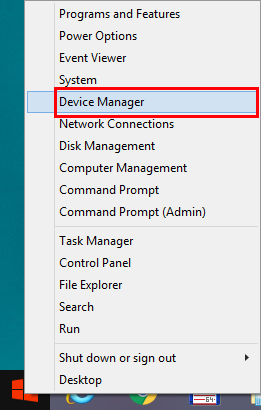
a. Right-click on Windows Start and go to Device Manager.
 Click to enlarge image
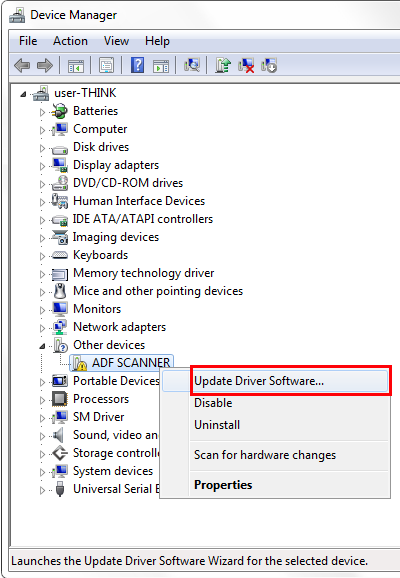
b. In the Device Manager window, right-click on this scanner under Other devices and select Update Driver Software.
 Click to enlarge image
c. Click Browse my computer for driver software.
d. Select the folder or the CD/DVD-ROM drive that contains this scanner’s driver and manually run the install.exe file.
