
 Brazil
 Latin
America
Latin
America USA &
Canada
USA &
Canada Australia
 China
China India
India Indonesia
 Japan
Japan Korea
Korea Taiwan
 Vietnam
 Austria
 France
 Germany
 Italy
Italy Netherlands
 Other
Europe
Other
Europe Poland
 Russia & CIS
 Spain
Spain Switzerland
 United Kingdom
 Saudi Arabia
  Turkey
 Israel
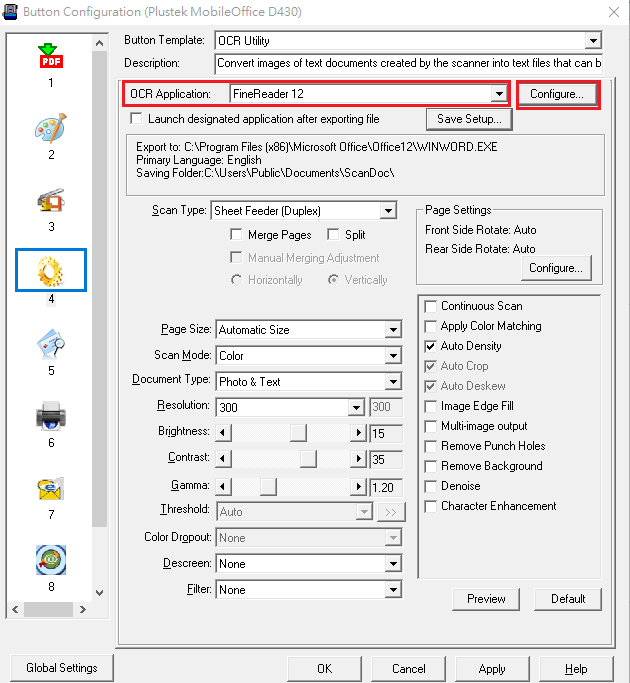
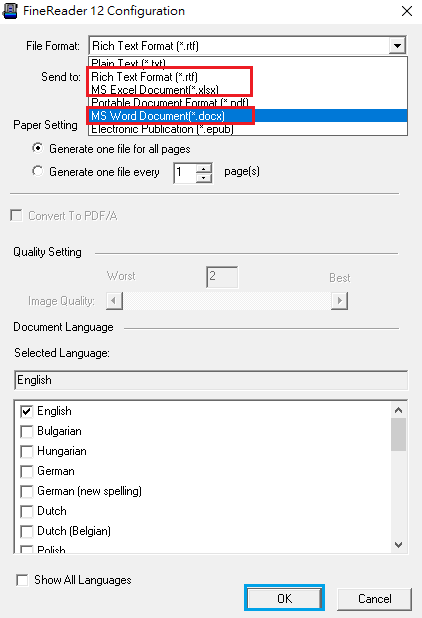
1. Save to editable text
Please choose "OCR" button and make sure the setting of "OCR Application" is "FineReader" . Then press "Configure" to enter "FineReader Configuration". You just need to select "File Format(rtf, xlsx , docx)" from dropdown list and press "OK" to finish all settings. Now you can double Click " OCR" button to scan.
 Click to enlarge image
×
 Click to enlarge image
×
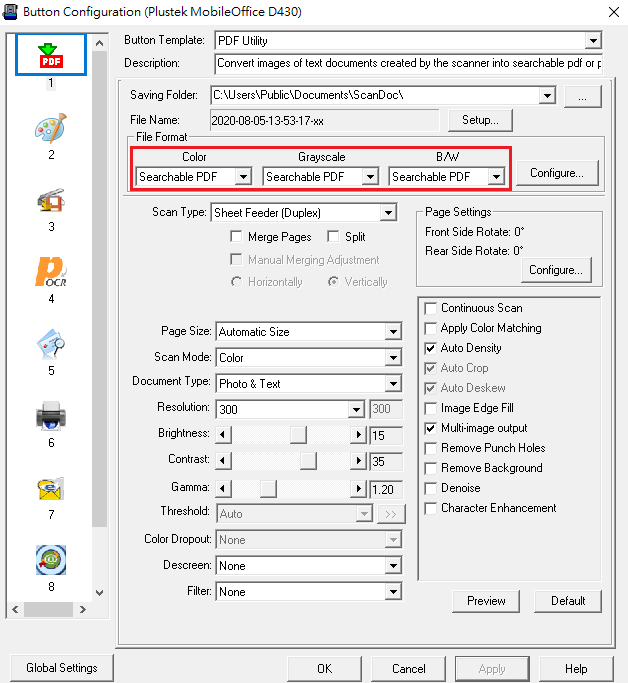
2.Save to searchable PDF
Choose "PDF" button and make sure the setting of "File format" is "Searchable PDF".Double Click " PDF" botton to scan.
 Click to enlarge image
×
