Brazil
 Latin
America
Latin
America USA &
Canada
USA &
Canada Australia
 China
China India
India Indonesia
 Japan
Japan Korea
Korea Taiwan
 Vietnam
 Austria
 France
 Germany
 Italy
Italy Netherlands
 Other
Europe
Other
Europe Poland
 Russia & CIS
 Spain
Spain Switzerland
 United Kingdom
 Saudi Arabia
  Turkey
 Israel
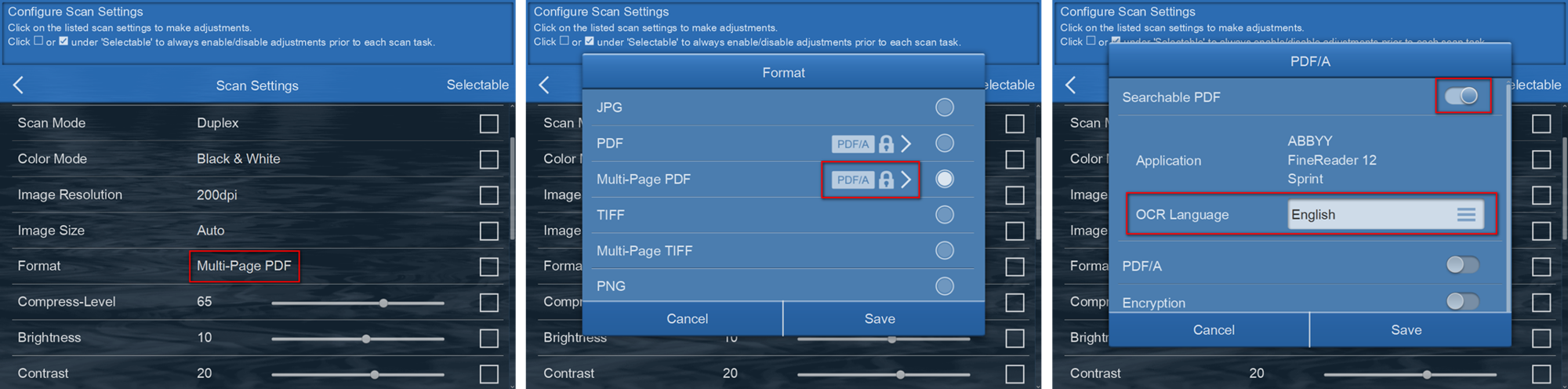
Setup can be configure under 'Scan Settings' > 'Format' > Select 'PDF' or 'Multi-Page PDF; > Click on the  > enable 'Searchable PDF' > select the 'OCR Language' from the dropdown list.
 Click to enlarge image
×
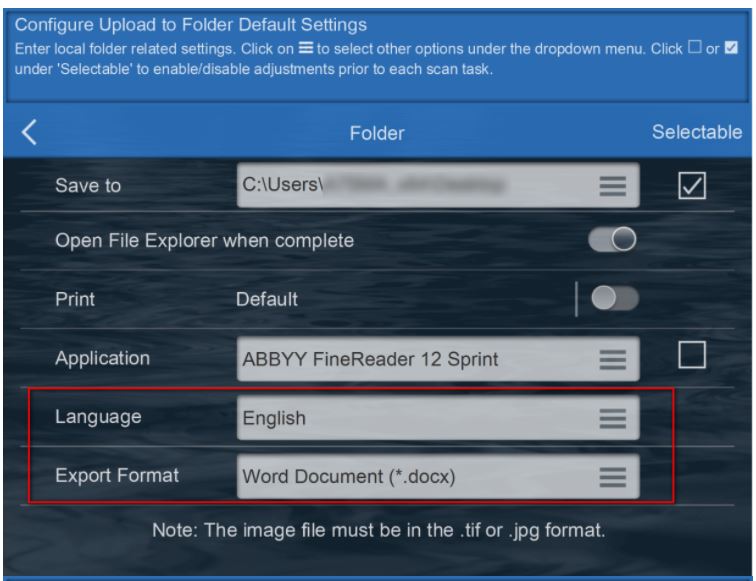
 'Application' > select 'ABBYY FineReader 12 Sprint > select the OCR 'Language' from the dropdown list > select final 'Export Format'. (note: scan images but be in .tif or .jpg format)