Clicking the FTP icon on the left pane in the Button Configuration window displays its current button settings on the right pane. |
The settings can be categorized into two: Session Name and File Saving Settings on the upper part, and Scan Parameters on the lower part. |
|
The items and parameters available in the window are explained as follows: |
|

Session Name and File Saving Settings |
|
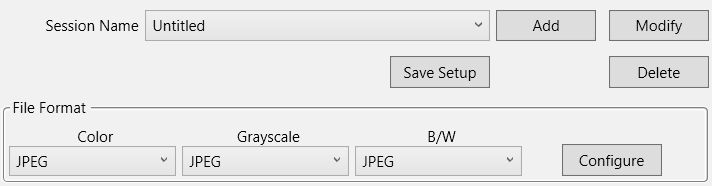
Session Name |
List the Session Name you have added in the FTP Connection Properties dialog box. You may select the desired FTP session from the drop-down list. |
|
More than one FTP session can be added to the drop-down list. |
• |
Clicking |

• |
Clicking |

• |
Clicking |

Save Setup |
Clicking this button opens the Save Setup dialog box where you may determine where and in what file name format the scanned documents or images are saved. |
File Format |
Determines the image file format to save the scanned documents or images to. The following file formats are available from the drop-down list box: |
• |
JPEG: Not available for B/W scan mode. |
• |
TIFF - Uncompressed |
• |
TIFF - Compressed |
• |
• |
PNG |
• |
Windows Bitmap |
Different file formats can be set for different scan modes. For example, if you usually need color images in JPEG and B/W images in BMP, you may configure so here. Next time when you scan a document in color first and then another document in B/W, you may simply change the scan parameters without the trouble of changing file formats frequently. |
|
Clicking |

|
Scan Parameters |
• |
• |
Card Scanning Mode (This function may or may not be available depending on the scanner model you purchase.) |
• |
• |
• |
• |
• |
Multi-feed Detection (This function may or may not be available depending on the scanner model you purchase.) |
• |
Multi-image output (This function may or may not be available depending on the scanner model you purchase.) |
• |
Remove Punch Holes (This function may or may not be available depending on the scanner model you purchase.) |
• |
• |
Auto Scan (This function may or may not be available depending on the scanner model you purchase.) |
||
• |
• |
|